Command Snippets
Save frequently used commands as reusable snippets and execute them with a single click from the terminal's snippet bar.
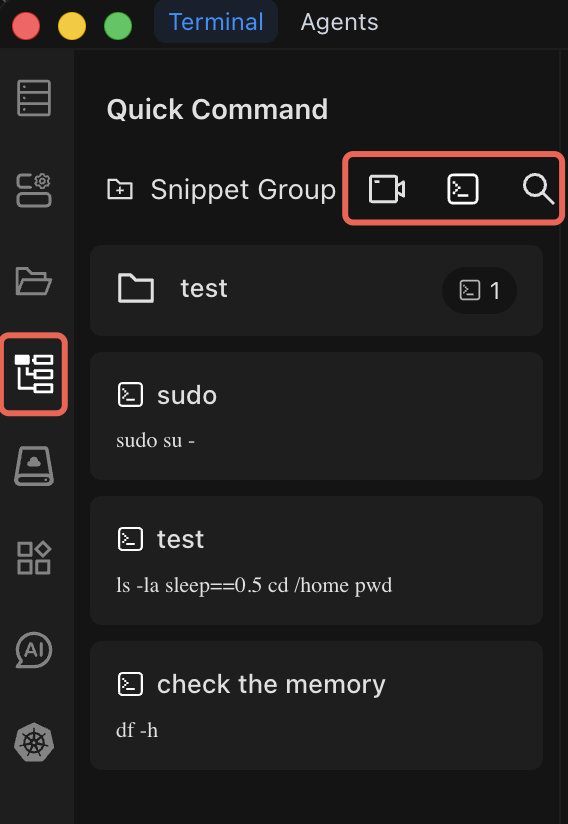
How Snippets Work
The snippet bar appears above the terminal input area. Each snippet displays a name and an execute button. Click the button to insert the command into the terminal, then press Enter to run it.
Creating a Snippet
Step by Step
- Open the snippet manager from the snippet bar.
- Click Create Snippet (or the "+" button).
- Fill in the fields:
- Name -- a short, descriptive label (e.g., "Check disk usage").
- Group -- assign the snippet to a group for organization (e.g., "Monitoring", "Deployment").
- Command -- the shell command or multi-command script to execute.
- Save the snippet. It now appears in the snippet bar.
Example Snippets
Here are practical snippets worth creating:
| Name | Command | Purpose |
|---|---|---|
| Disk Usage | df -h | Quick check of filesystem usage |
| Top Memory Processes | ps aux --sort=-%mem | head -20 | Find the top 20 memory-consuming processes |
| Tail App Logs | tail -f /var/log/app/application.log | Live-follow application logs |
| Restart Nginx | sudo systemctl restart nginx && sudo systemctl status nginx | Restart and verify nginx status |
| Backup Config | cp /etc/nginx/nginx.conf /etc/nginx/nginx.conf.bak | Back up a config file before editing |
| Docker Cleanup | docker system prune -af --volumes | Remove unused Docker images, containers, and volumes |
Macro Recording
Instead of typing commands manually, you can record a sequence of terminal operations and save them as a snippet automatically.
How to Record a Macro
- Click the Record button in the snippet bar to start recording.
- Execute the commands you want to capture in the terminal as you normally would.
- Click Stop Recording when you are finished.
- Chaterm generates a snippet from the recorded commands.
- Give the snippet a name and group, then save it.
Macro recording is especially useful for capturing multi-step workflows that you perform regularly, such as deployment sequences or environment setup routines.
Managing Snippets
Command Groups
Organize snippets into groups to keep them manageable:
- Monitoring -- system status, logs, resource usage.
- Deployment -- build, deploy, rollback commands.
- Database -- backup, restore, query commands.
- Networking -- connectivity checks, firewall rules.
Editing and Deleting
- Click on a snippet to edit its name, group, or command.
- Delete snippets you no longer need to keep the snippet bar clean.
Tips
- Combine with AI. Use Chat to AI to generate a command, then save it as a snippet for future use.
- Use multi-command snippets. Chain commands with
&&to create reliable multi-step operations (the chain stops if any command fails). - Name snippets clearly. Use descriptive names so you can identify them at a glance in the snippet bar.
- Avoid storing secrets. Never put passwords, tokens, or API keys directly in a snippet. Use environment variables or secret managers instead.
Security Notice
- Review snippet commands before executing them, especially after editing.
- Avoid including sensitive information (passwords, tokens) in command snippets.
- Verify destructive commands in a test environment before running them in production.
- Regularly audit your snippets and remove those you no longer need.