MCP Usage Guide
What is MCP?
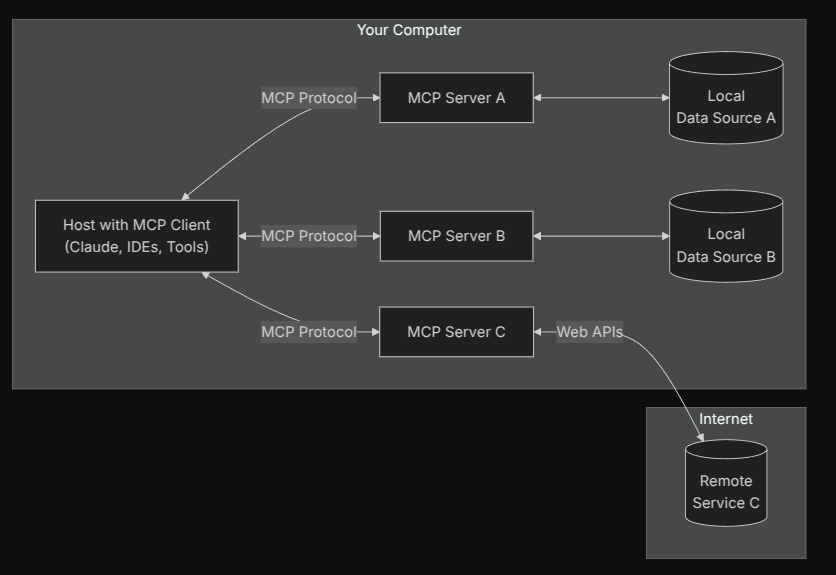
MCP (Model Context Protocol) is a standardized protocol for exposing external "capabilities" (such as retrieval, search, file access, code analysis, third-party APIs, etc.) as "servers" to clients (such as Chaterm). In Chaterm, you can connect to multiple MCP servers, view the "Tools" and "Resources" they provide, and call these capabilities as needed in chat or workflows.
Quick Start
Where to find MCP servers
- GitHub repositories:
- Online MCP websites:
- PulseMCP: www.pulsemcp.com
You can select appropriate servers from the above sources (such as filesystem, search, knowledge base, code tools, etc.).
Adding a new MCP server in Chaterm
- Open the "Settings" page in Chaterm.
- Find the
Tools & MCPtab on the left, clickAdd Server, and the system will automatically open the mcp_setting.json file. - Add a new server configuration (JSON) in the editor.
- After saving, Chaterm will automatically read and attempt to connect to the server.
Local MCP server example (stdio type):
// MCP server using stdio transport
{
  "mcpServers": {
    "filesystem": {
      "command": "npx",
      "args": [
        "-y",
        "@modelcontextprotocol/server-filesystem",
        "/Users/username/Desktop",
        "/path/to/other/allowed/dir"
      ]
    }
  }
}
Remote MCP server example (Streamable HTTP type):
{
  "mcpServers": {
    "context7": {
      "url": "https://mcp.context7.com/mcp",
      "headers": {
        "CONTEXT7_API_KEY": "your-api-key"
      },
      "disabled": false
    }
  }
}
After saving:
- You will see the server item's status badge change from "connecting" to "connected", or display error messages.
- Tools and Resources will be automatically loaded and their counts displayed.

Configuration fields (recommended to check after adding a server)
Reference
schemas.tsin the project:
- Common fields (supported by both types):
disabled?,timeout?(seconds, default value see application),autoApprove?(string array).typeis optional: Can be omitted whencommand(inferred as stdio) orurl(inferred as http) is provided; recommended to explicitly fill for better readability.- Compatible fields: Legacy
transportTypeis supported, the application will automatically convert it totype; not recommended to continue using in new configurations.
STDIO server configuration (local command-line server)
| Field | Required | Description | Example |
|---|---|---|---|
type | No | Connection type, inferred as stdio when command is provided if omitted | "stdio" |
command | Yes | Executable command to start. Can be written as a complete line (with parameters) or just executable name | "npx", "node", "python" |
args | No | Array of arguments passed to the command; when command contains spaces and args is not provided, the system will automatically parse (supports quotes and escaping) | ["-y", "@modelcontextprotocol/server-filesystem"] |
cwd | No | Process working directory | "/Users/you" |
env | No | Process environment variables (key-value pairs) | {"API_KEY": "xxx"} |
disabled | No | Whether to disable this server | true/false |
timeout | No | Call timeout (seconds) | 120, 180 |
autoApprove | No | Auto-approve tool whitelist (by tool name) | ["read_file"] |
Notes:
envFilefield is not supported; if you need to load variables from a file, handle it in the startup environment before writing toenv.- Compatible fields: For backward compatibility,
url?,headers?are also allowed in stdio configuration, but not recommended (will not switch connection type to http).
HTTP server configuration (remote service)
| Field | Required | Description | Example |
|---|---|---|---|
type | No | Connection type, inferred as http when url is provided if omitted | "http" |
url | Yes | Server address (supports streaming HTTP client) | "https://your-mcp-host.example.com/" |
headers | No | Request headers (e.g., authentication, proxy related) | {"Authorization": "Bearer <TOKEN>"} |
disabled | No | Whether to disable this server | true/false |
timeout | No | Call timeout (seconds) | 120, 180 |
autoApprove | No | Auto-approve tool whitelist (by tool name) | ["search"] |
Notes:
urlmust be a valid URL (strictly validated by schema).- Compatible fields: For backward compatibility,
command?,args?,env?are also allowed in http configuration, only for old configuration migration scenarios; not recommended for long-term use.
Development tips: File changes and automatic restart
- If you run locally with build artifacts (e.g.,
build/index.js), when this file changes, the application will detect it and attempt to restart the corresponding stdio server, facilitating development and debugging. - If automatic restart is not triggered, you can manually reconnect by "Disable → Enable".
Using MCP in conversations
Tool toggle
Click on the tool name in the Tools tool list to enable/disable the tool. Disabled tools will no longer be loaded into the model context, and the Agent will not be able to use the tool. Reasonably closing unused tools can greatly save tokens. 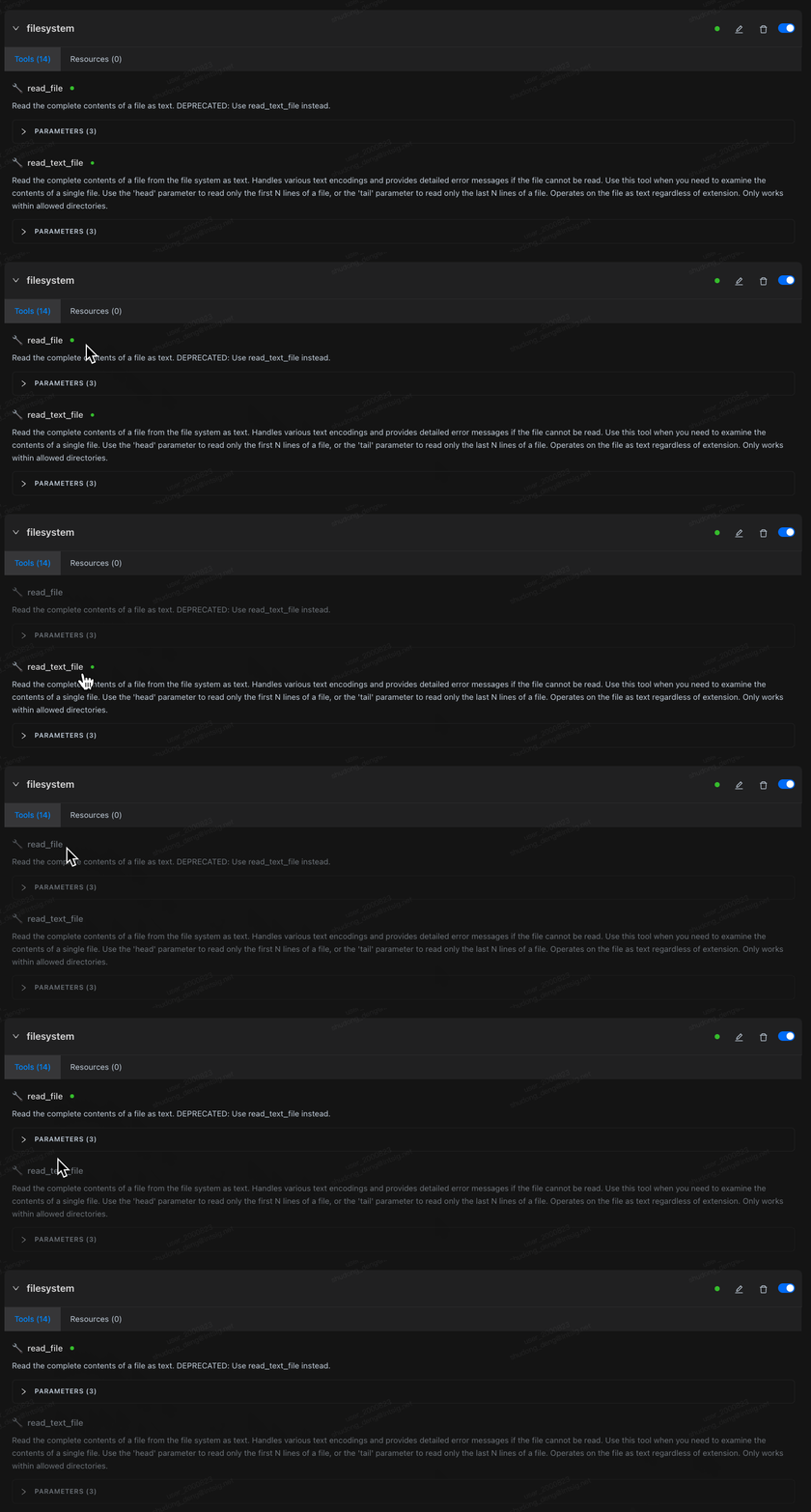
Auto-approval
After adding tool names to autoApprove in the configuration, matching tools will skip confirmation and execute directly. Please only enable this for trusted tools in the whitelist. Can also be added dynamically during tool execution. 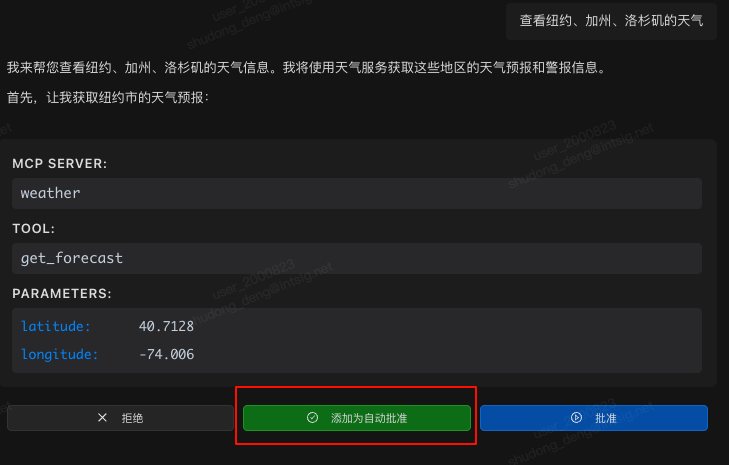
Parameter viewing & resource browsing
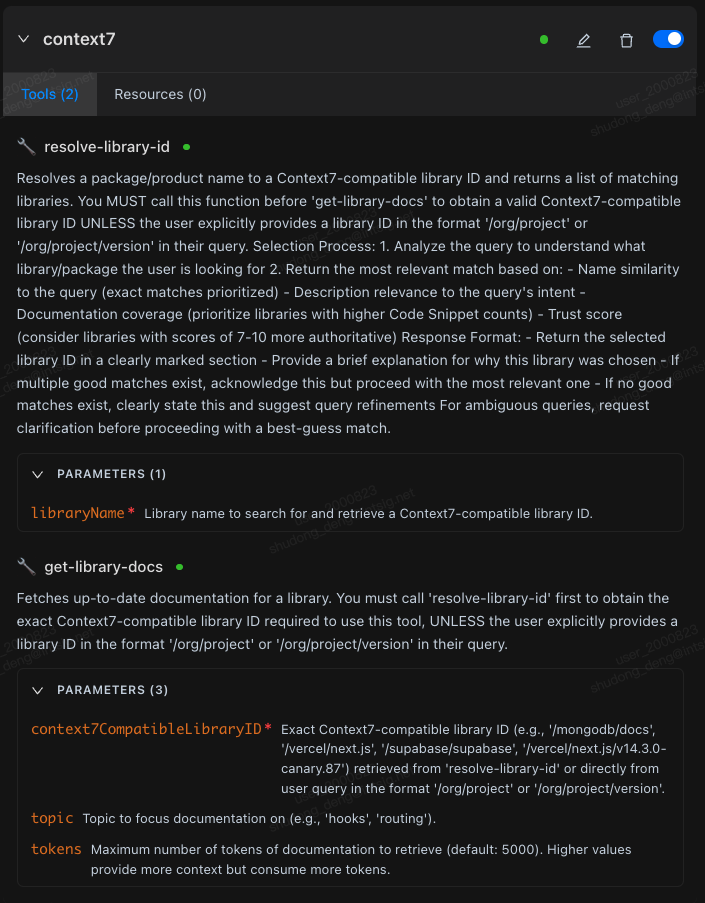
Expand the tool's PARAMETERS collapsible panel to view parameter names, whether they are required, and descriptions, facilitating correct parameter provision in conversations.
In Resources, view resource names, descriptions, and URIs; can be directly read in supported entry points.
Common configuration and security recommendations
- Security: Only add trusted tools to
autoApprove, be cautious when injecting credentials inenv/headers. - Performance: For general networks, set
timeoutto 120 ~ 180; for remote services, recommend nearby access and ensure proxy is friendly to streaming connections. - Maintainability: Unified naming and grouping of similar servers for easy search and sorting; backup configuration files as needed.
Further reading
- Encountering connection/call issues, or want to learn about security/performance recommendations: Please read Troubleshooting & Best Practices.