Model List
Chaterm supports multiple AI model providers out of the box, and you can add your own for maximum flexibility.
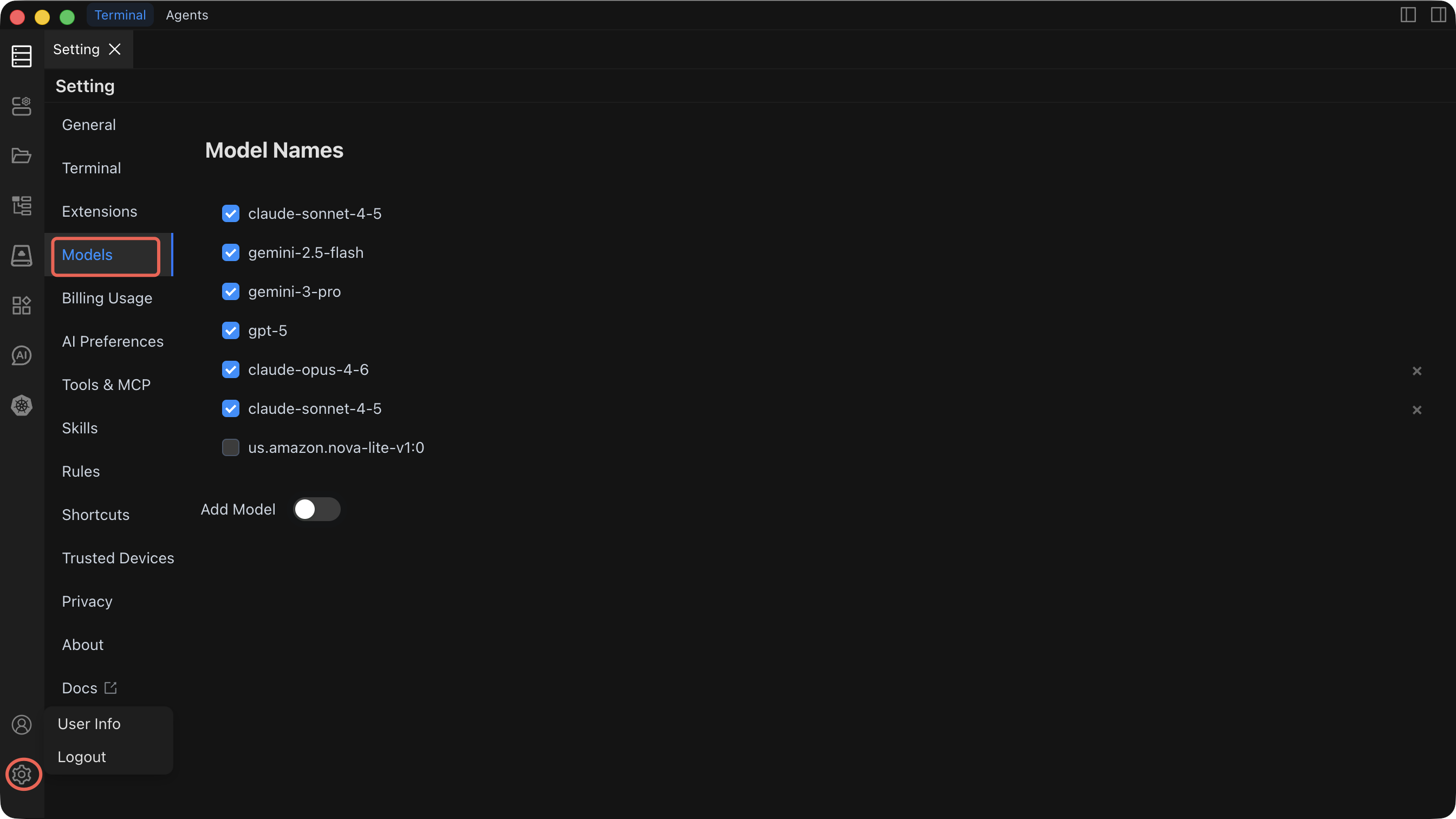
Built-in Models
Chaterm ships with several high-quality models pre-configured and ready to use — no setup required. Simply select one from the model dropdown in any AI dialog.
Getting Started with Your First Custom Model
Follow these steps to add a custom model provider. The example below uses OpenAI, but the process is similar for all providers.
- Open Settings by clicking the gear icon in the top-right corner.
- Navigate to the "Models" tab in the left menu.
- Click "Add Model".
- Select OpenAI (or your preferred provider) from the provider list.
- Enter the API endpoint URL (e.g.,
https://api.openai.com/v1). - Paste your API key.
- Type or select a model name (e.g.,
gpt-5). - Click "Test Connection" — a success message confirms everything is working.
- Click "Save" — the model now appears in your model dropdown across all AI dialogs.
Recommended first setup
If you are new to Chaterm's AI features, start with DeepSeek or OpenAI. Both require only an API key, have straightforward setup, and provide strong general-purpose models suitable for command generation and agent tasks.
Provider Reference
1. LiteLLM
Connect to multiple model providers through a unified LiteLLM gateway.
| Configuration Item | Description | Required |
|---|---|---|
| URL Address | LiteLLM service endpoint | Yes |
| API Key | Access key for the LiteLLM gateway | Yes |
| Model Name | Model identifier (e.g., gpt-5, claude-sonnet-4-6) | Yes |
Best for: Teams that already run a LiteLLM proxy to unify access to multiple providers behind a single endpoint.
2. OpenAI
Connect directly to OpenAI or any OpenAI-compatible API.
| Configuration Item | Description | Required |
|---|---|---|
| OpenAI URL Address | API endpoint (default: https://api.openai.com/v1) | Yes |
| OpenAI API Key | Your OpenAI API key | Yes |
| Model Name | Model to use (e.g., gpt-5, claude-sonnet-4-6, claude-opus-4-5) | Yes |
Best for: Direct access to OpenAI models, or connecting to third-party services that expose an OpenAI-compatible API.
3. Amazon Bedrock
Use AWS Bedrock for enterprise-grade AI with AWS security and compliance.
| Configuration Item | Description | Required |
|---|---|---|
| AWS Access Key | IAM access key ID | Yes |
| AWS Secret Key | IAM secret access key | Yes |
| AWS Session Token | Temporary session token (for assumed roles) | No |
| AWS Region | Service region (e.g., us-east-1) | Yes |
| Custom VPC Endpoint | Private endpoint for VPC-based access | No |
| Cross-Region Inference | Enable inference across multiple regions | No |
| Model Name | Bedrock model identifier | Yes |
Best for: Organizations already invested in AWS that need enterprise security, compliance controls, and private network access.
4. DeepSeek
Connect to the DeepSeek API for strong reasoning and coding capabilities.
| Configuration Item | Description | Required |
|---|---|---|
| DeepSeek API Key | Your DeepSeek API key | Yes |
| Model Name | Model to use (e.g., deepseek-chat, deepseek-reasoner) | Yes |
Best for: Cost-effective access to models with strong reasoning and code generation capabilities.
5. Ollama (Local Deployment)
Run models locally for maximum privacy and offline access.
| Configuration Item | Description | Required |
|---|---|---|
| Ollama URL Address | Local service address (default: http://localhost:11434) | Yes |
| Model Name | Locally installed model (e.g., llama3, codellama, mistral) | Yes |
Best for: Air-gapped environments, data-sensitive workloads, or experimentation without API costs.
TIP
Make sure the Ollama service is running before testing the connection. You can start it with ollama serve and pull models with ollama pull <model-name>.
Configuration Tips
- Test after every change — Always click "Test Connection" after modifying any provider configuration.
- Multiple models — You can configure several providers and models simultaneously, then switch between them per dialog.
- API key security — Chaterm stores credentials locally. Rotate keys periodically with your provider.
- Performance — Monitor response times. Local models (Ollama) have no network latency but depend on your hardware. Cloud models are faster on powerful servers but add network round-trip time.
Related Documentation
- AI Settings — Create dialogs and configure providers step by step
- AI Preferences — Adjust reasoning depth, auto-execution, and security policies