
This article shows Chaterm addresses the pain points of traditional bastion host usage through technological innovation: upgrading from cumbersome multi-step redirects to one-click access.
By comparing traditional and innovative models, it showcases Chaterm's technological breakthroughs in improving operational efficiency, reducing operational complexity, and enhancing management capabilities.
Introduction
In traditional JumpServer bastion host usage scenarios, maintenance personnel need to go through a cumbersome process of "logging into the bastion host → selecting the target server → reconnecting" to access the target server. This operation method is not only inefficient but also prone to errors, especially in scenarios requiring frequent access to multiple servers, where the operational complexity increases exponentially.
This article will delve into how Chaterm, through technological innovation, has evolved from a traditional redirection model to a one-click access model, significantly improving operational efficiency, and will explore its practical application value in enterprise-level IT operations and maintenance.
Traditional Mode vs. Innovative Mode: Technical Comparison Analysis
Traditional Mode: Local Connection - Universal but Cumbersome
In the traditional mode, users need to manually configure the bastion host connection, requiring multiple steps each time they access the target server:
Technical Implementation Characteristics
Connection Method: Local SSH connection + bastion host redirection
Authentication Mechanism: Supports dual authentication with key and password
Applicable Scenarios: Universal scenarios, strong compatibility
Operational Complexity: High (3-4 steps)
Scalability: Manual configuration, difficult to manage in batches
Operation Flow Analysis
Technical Pain Points
Cumbersome Operation: Requires repeated login process for each access.
Low Efficiency: Multiple redirects increase connection time.
Error-Prone: Manual selection easily leads to selecting the wrong target server.
Lack of Management: Inability to group and tag servers.
Innovative Model: Enterprise Resources - Intelligent and Efficient
Chaterm achieves intelligent management and one-click connection of bastion host assets through its enterprise resource model:
Technical Implementation Features
Connection Method: API integration + intelligent routing
Convenient Management: Customizable notes + folder management
Applicable Scenarios: Enterprise-level scenarios, feature-rich
Operational Complexity: Low (1-step operation)
Operation Flow Analysis
Technical Advantages
One-Click Access: Directly connects to the target server without intermediate redirects.
Intelligent Management: Supports advanced functions such as server grouping, tagging, and annotation.
Batch Processing: Supports concurrent connections and batch operations.
In-Depth Analysis of Technical Implementation
1. Asset Discovery and Management Mechanism
Limitations of Traditional Mode
# Traditional method requires manual maintenance of the host list.
ssh user@jumpserver
# Manually select the target server after logging in.
Innovative Mode Implementation
// Automatic asset discovery in Chapter Enterprise Resource Mode
const assetDiscovery = {
api: "/api/v1/assets/",
refresh: true,
grouping: true,
tagging: true,
};
Actual Operation Comparison: Traditional Mode vs. Innovative Mode
Traditional Mode: Local Connection Operation Flow
Step 1: Key Configuration (if needed)
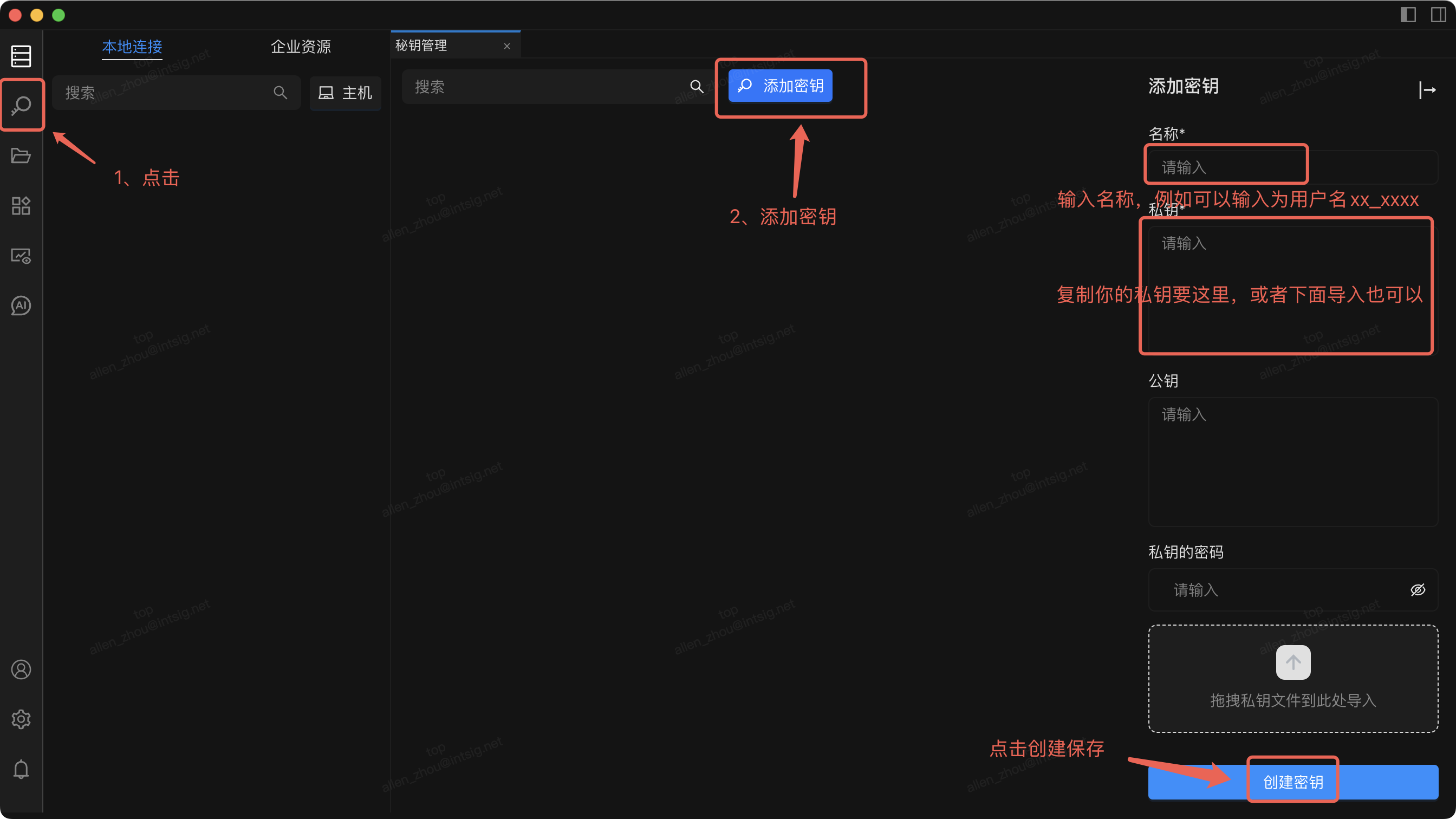
Key Technical Points:
Supports importing private key files
Supports configuring private key passwords
Local key management
Step 2: Bastion Host Connection Configuration
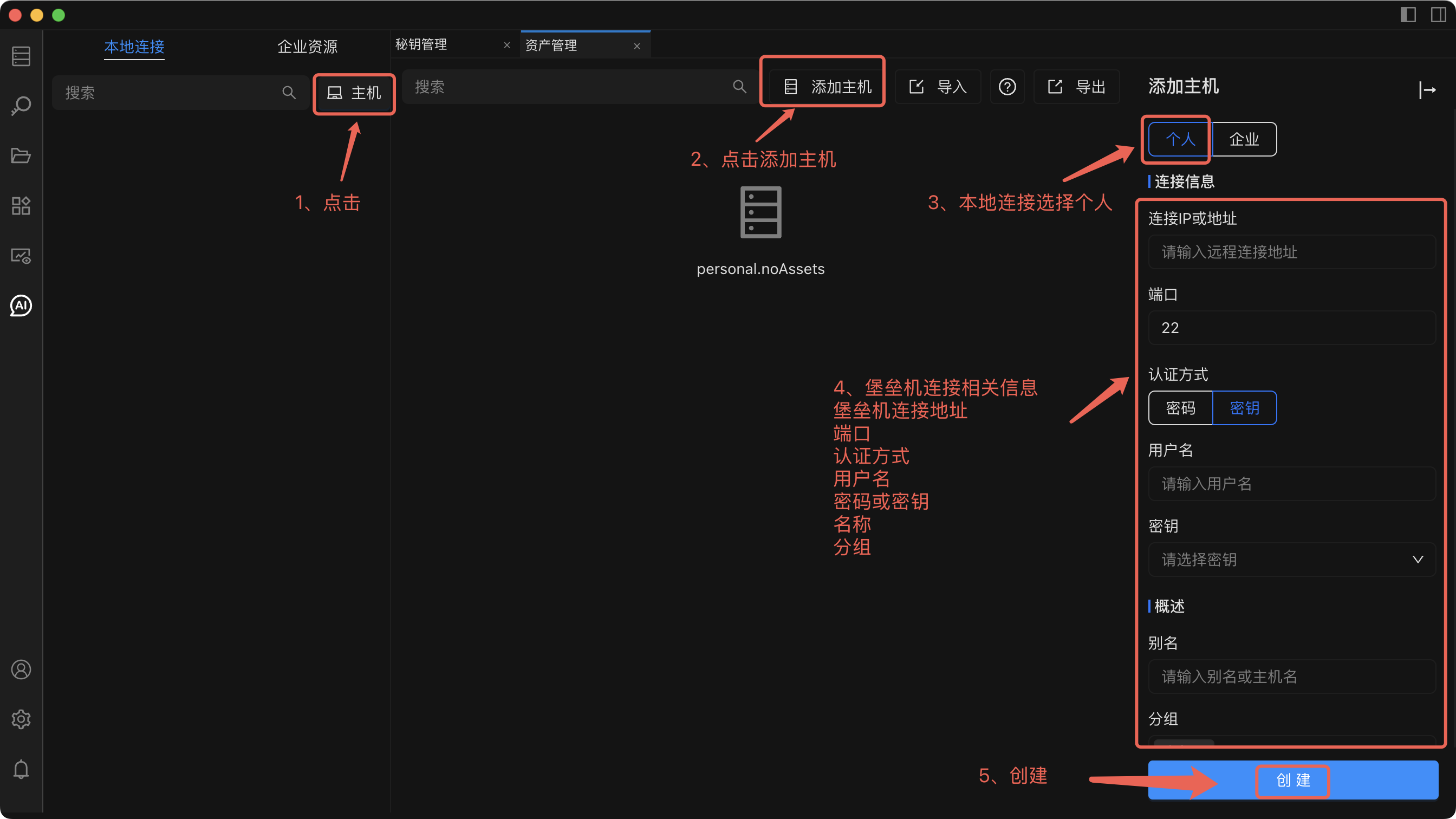
Technical Features:
Manually configure connection parameters
Supports importing/exporting host lists
Basic connection management
Step 3: Multi-Step Redirect Connection
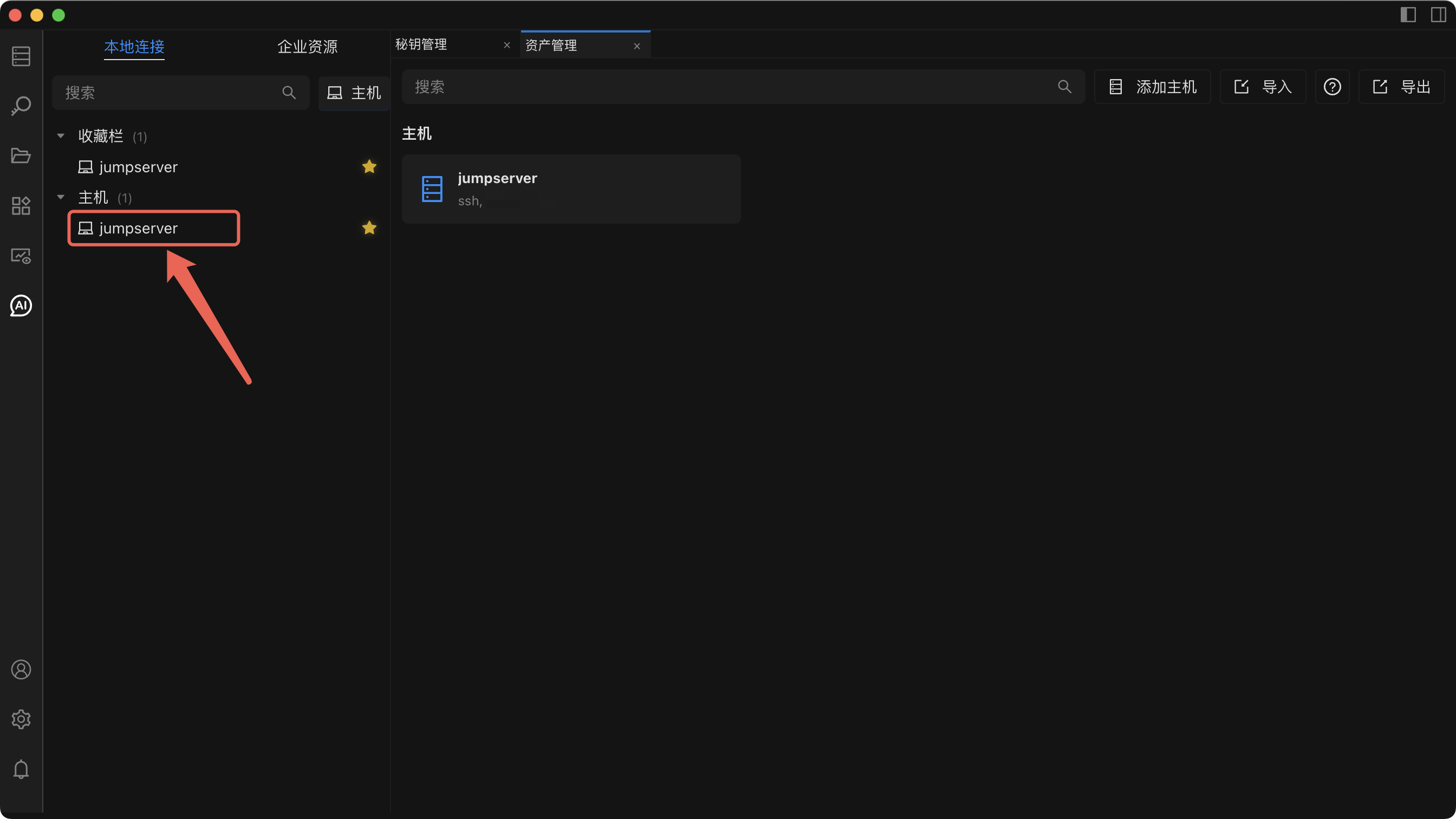
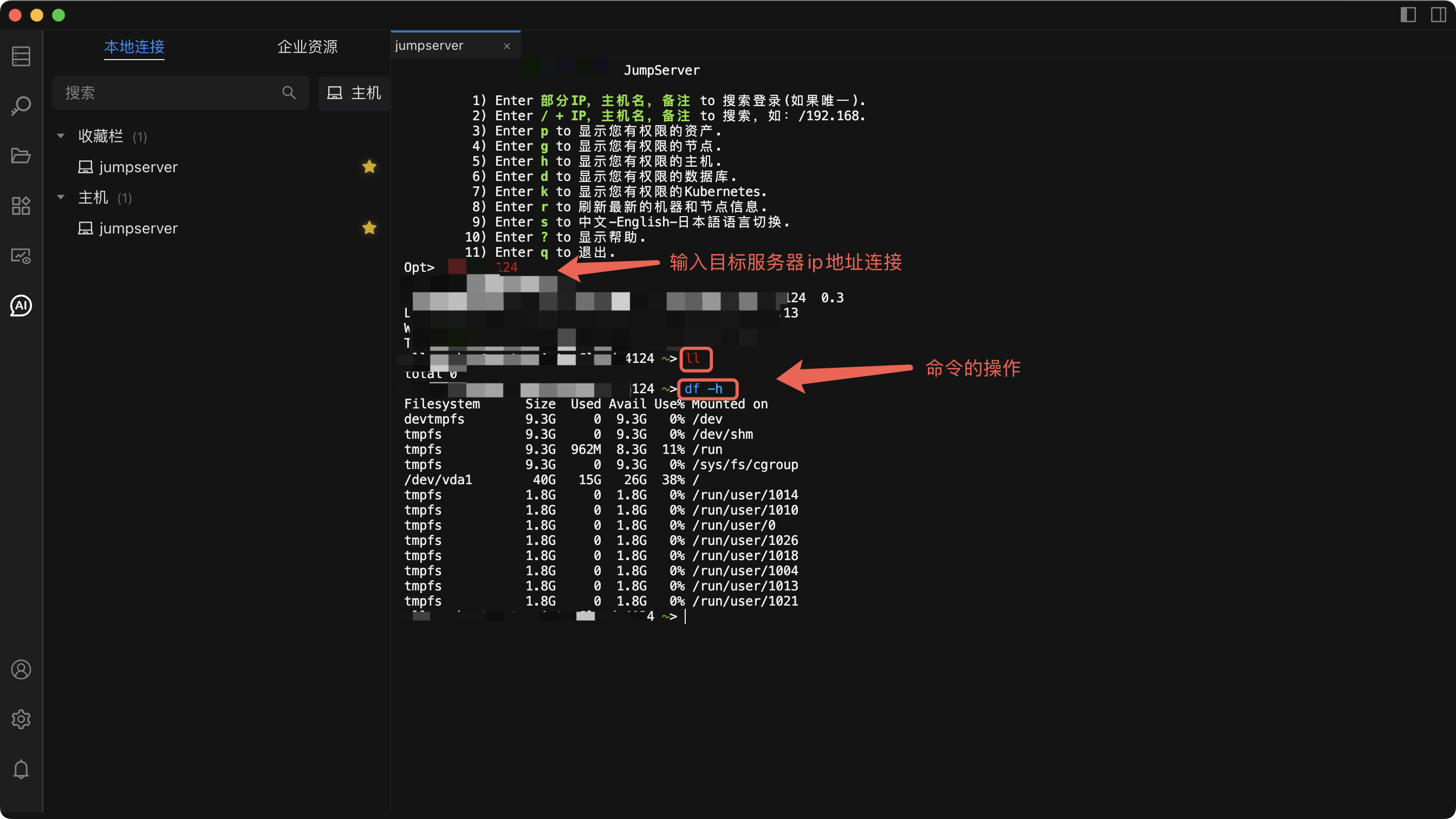
Operation Complexity Analysis:
# Traditional Mode Connection Steps
Step 1: Connect to the bastion host (5-30 seconds)
Step 2: Select the target server (5-10 seconds)
Step 3: Establish the final connection (10-20 seconds)
Total: 20-60 seconds
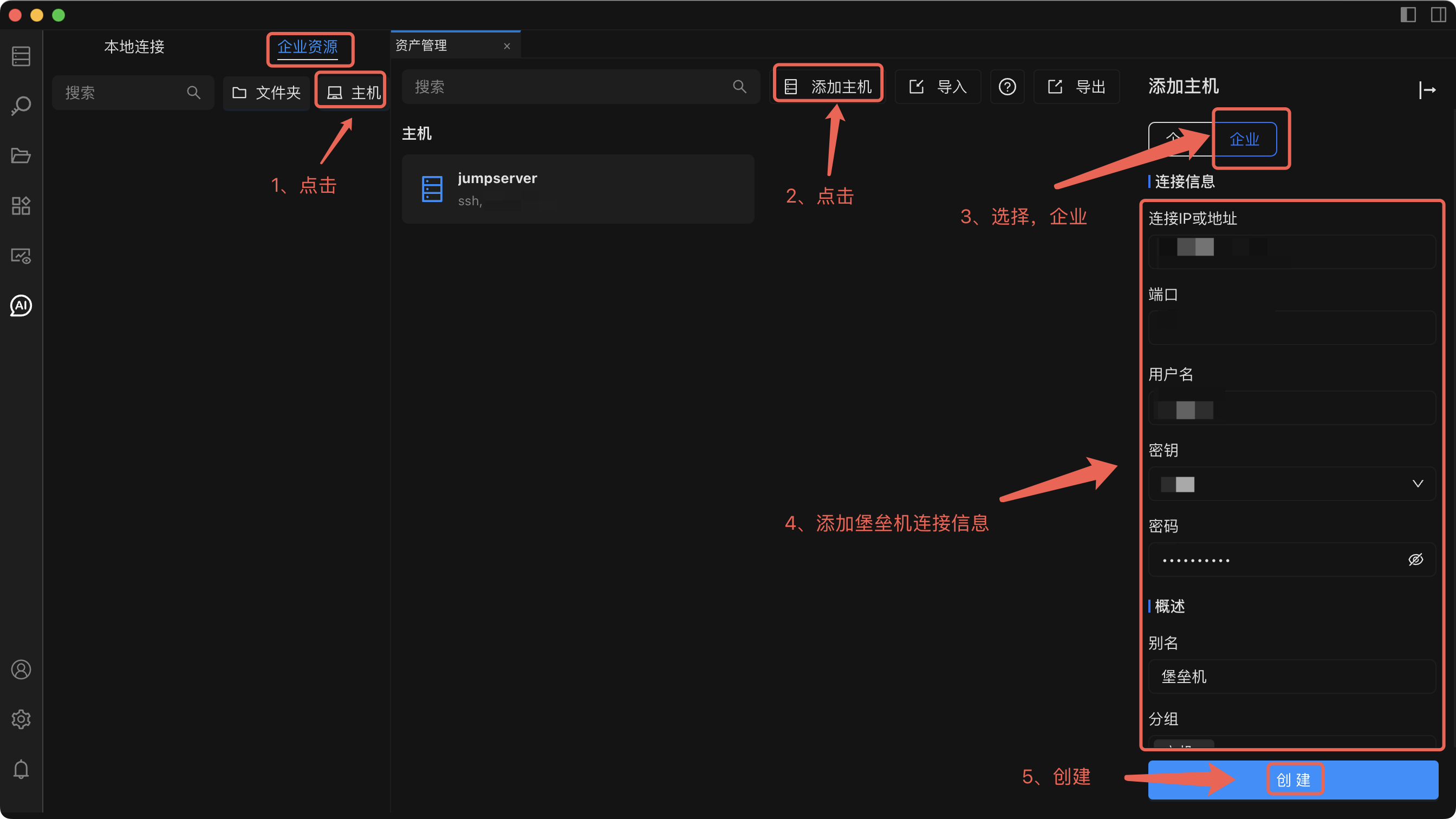
Innovative Model: One-Click Direct Connection to Enterprise Resources
Step 1: Enterprise Resource Configuration
Step 2: Intelligent Asset Refresh
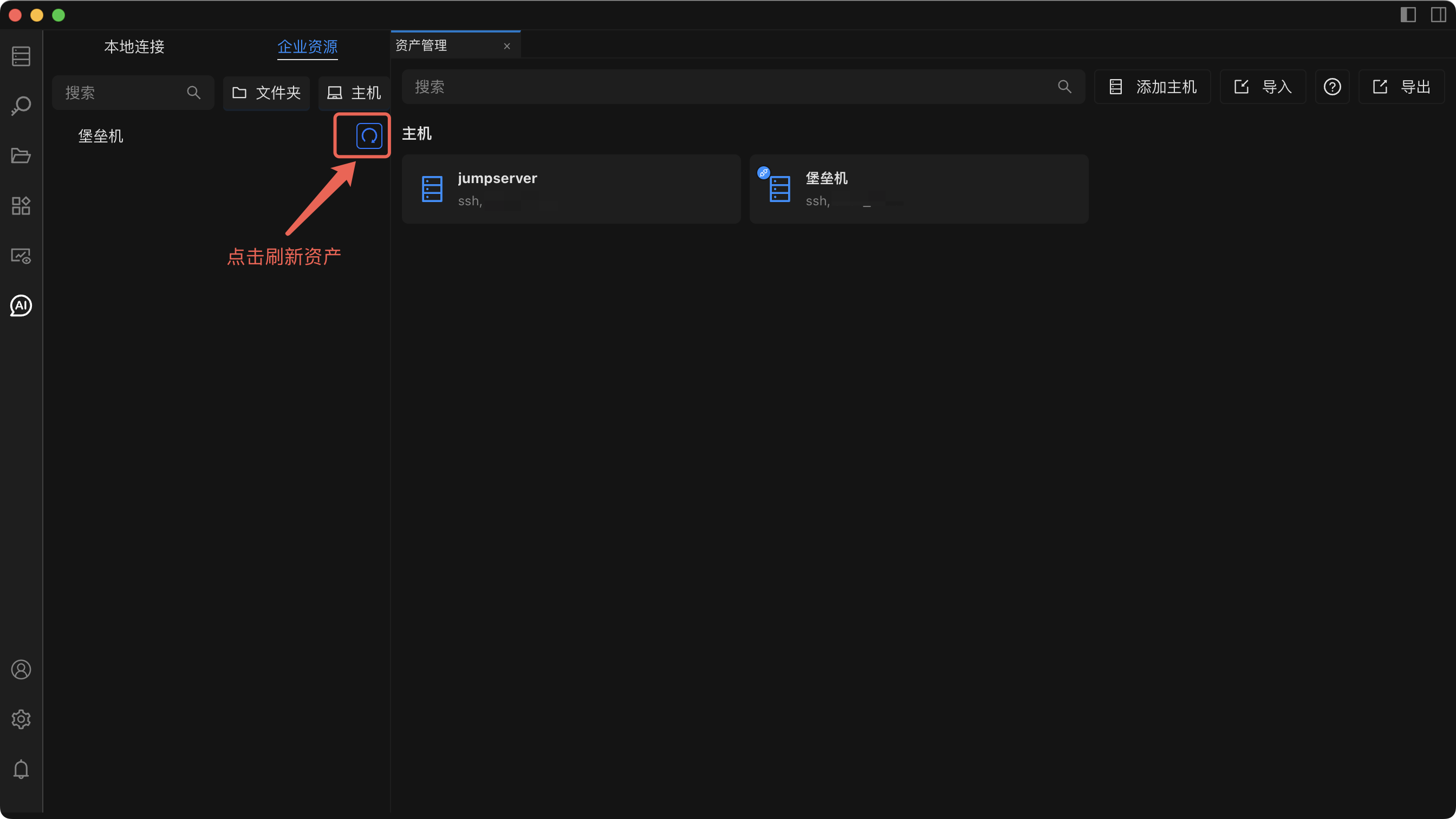
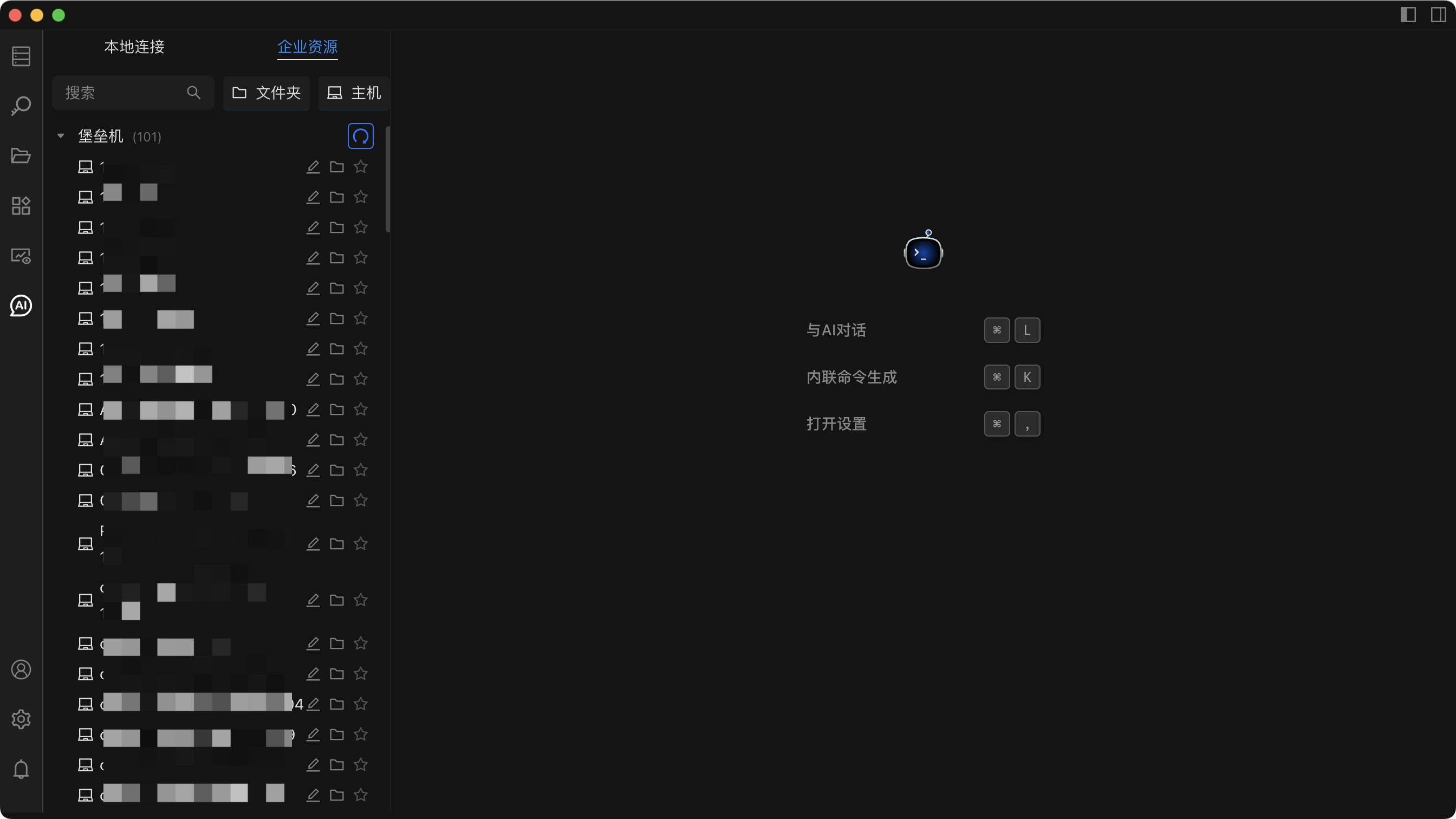
Technical Features:
Automatic Asset Discovery and Synchronization
Intelligent Grouping and Tag Management
Automatic Permission Verification and Update
Step 3: One-Click Direct Connection to Target Server
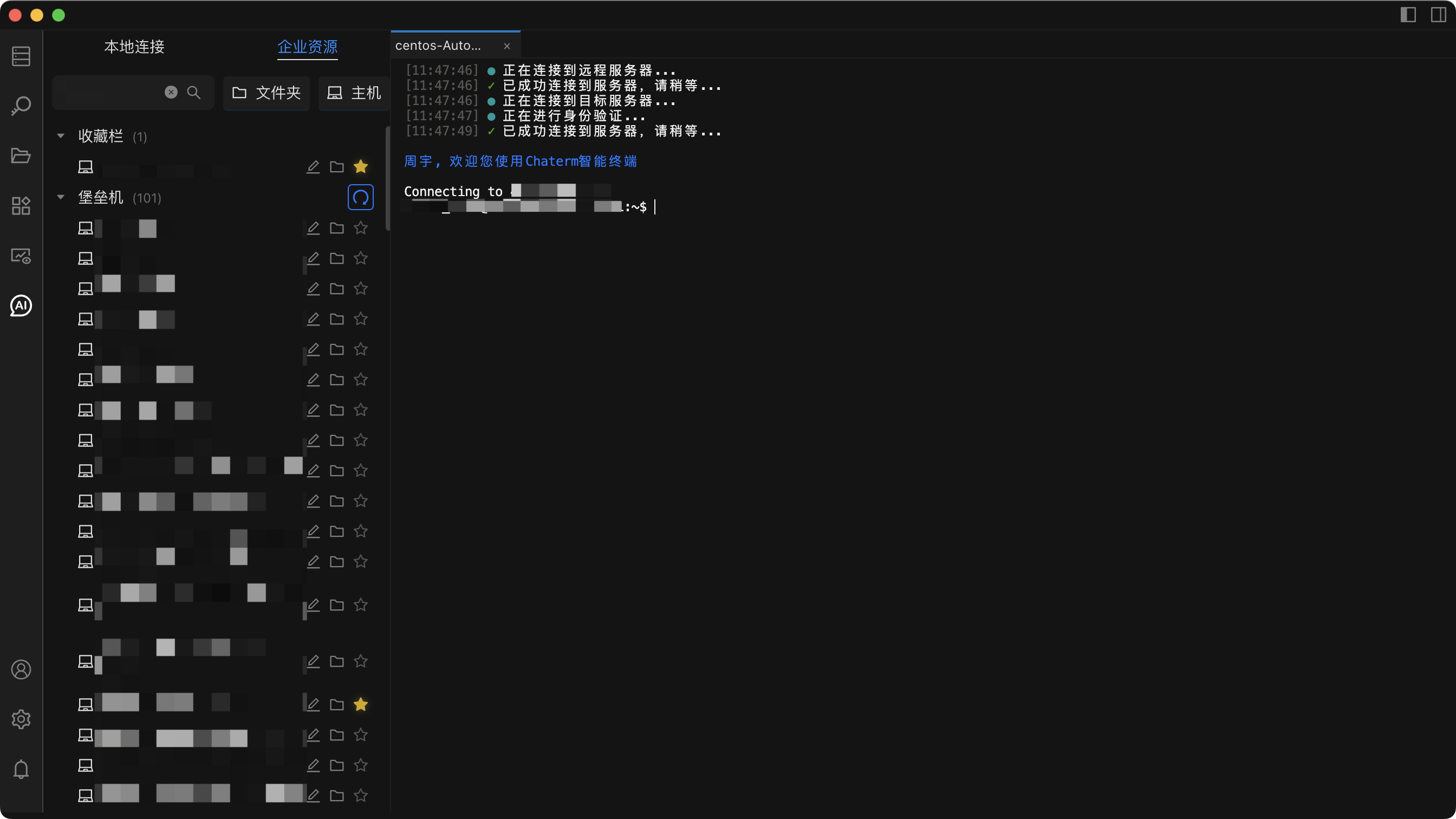
Operation Complexity Analysis:
# Innovative Mode Connection Steps
Step 1: Select Target Server (2-3 seconds)
Step 2: One-Click Direct Connection (3-5 seconds)
Total: 5-8 seconds
Advanced Feature Comparison: Asset Management Capabilities
Traditional Mode Limitations
In traditional mode, users cannot effectively manage servers:
- ❌ Cannot add server notes
- ❌ Cannot perform group management
- ❌ Cannot quickly search and locate
- ❌ Lack of a visual interface
Innovative Mode Enhancements
Smart Note Function
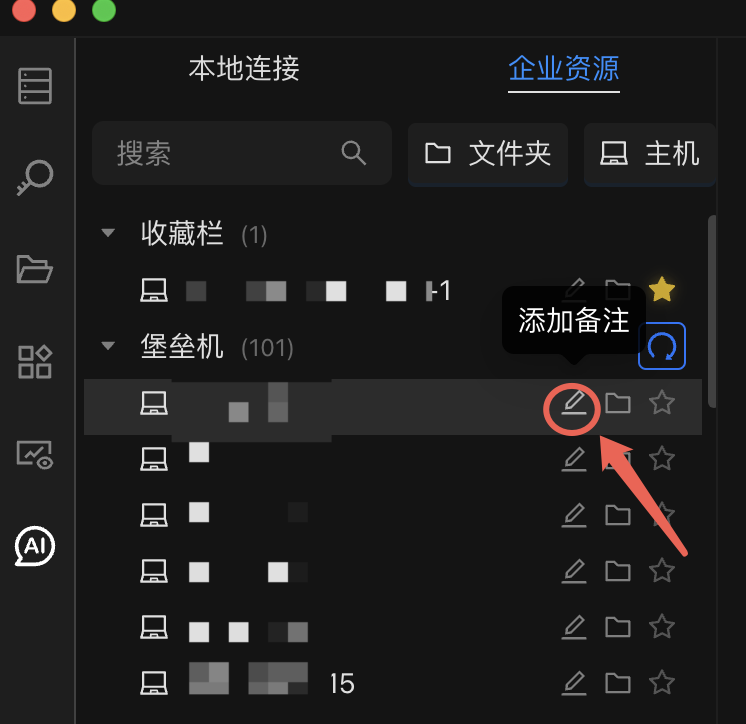
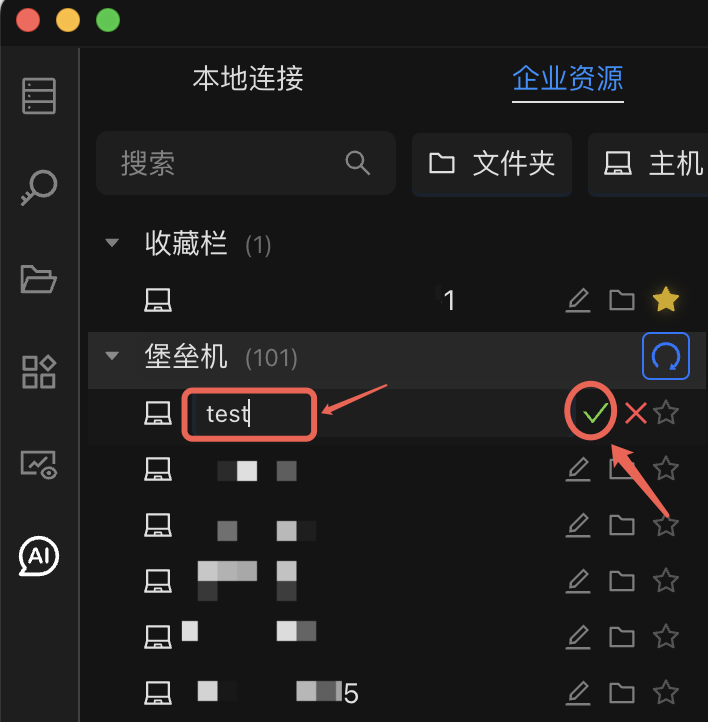
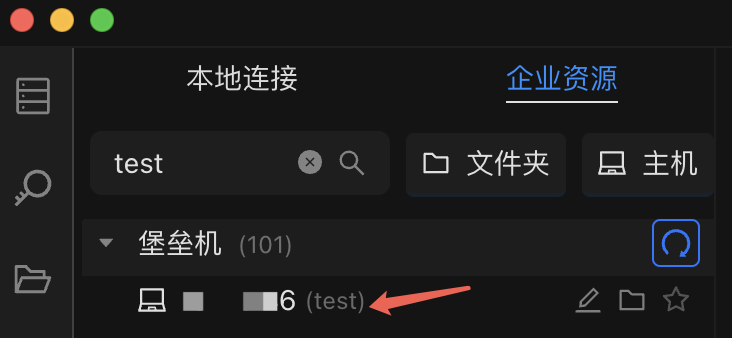
Technical Value:
Supports server annotation and tag management
Intelligent search and filtering functions
Significantly improves operational efficiency
Reduces operational error rate
Enhances asset visualization capabilities
Custom Folder Management
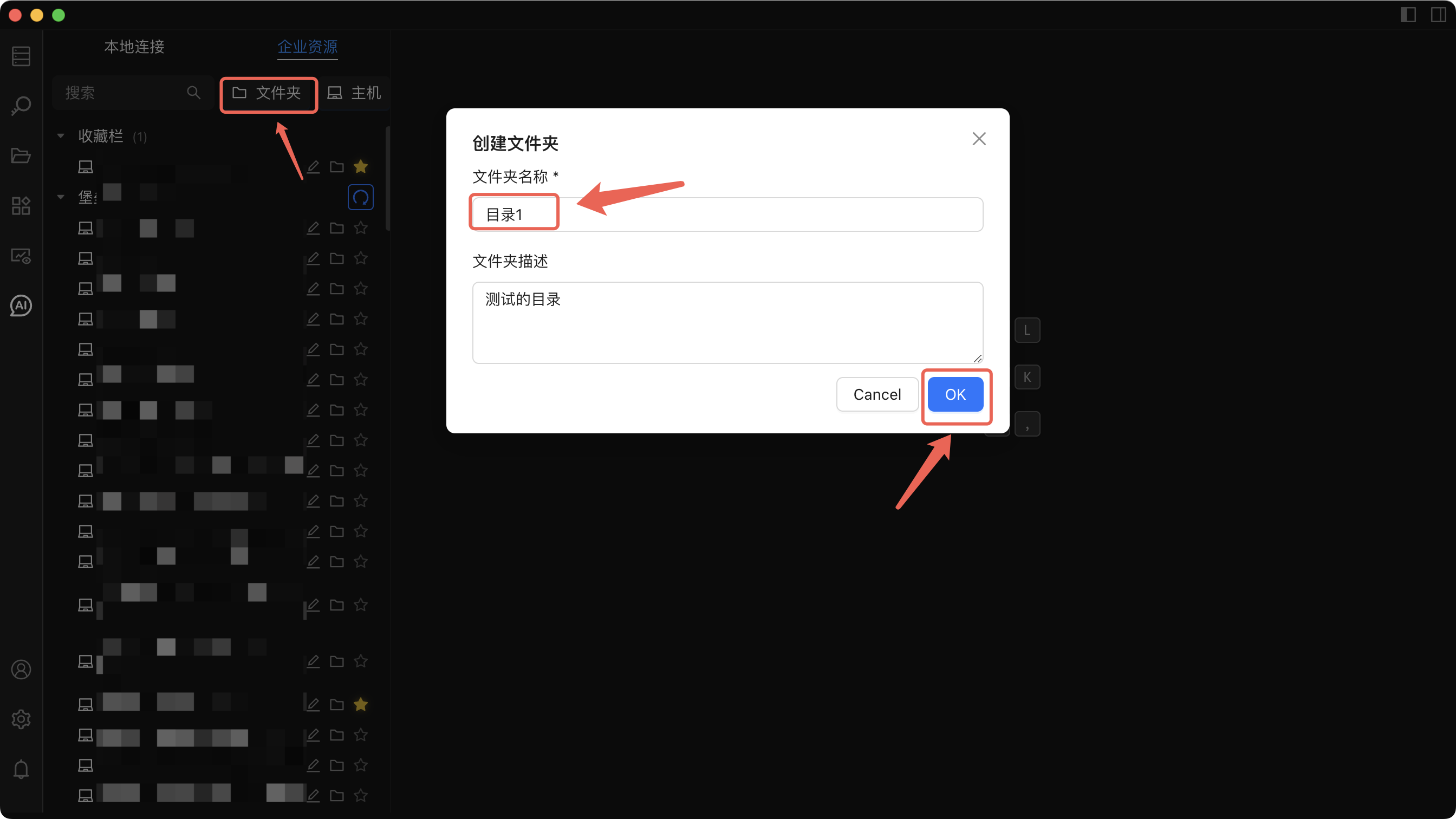
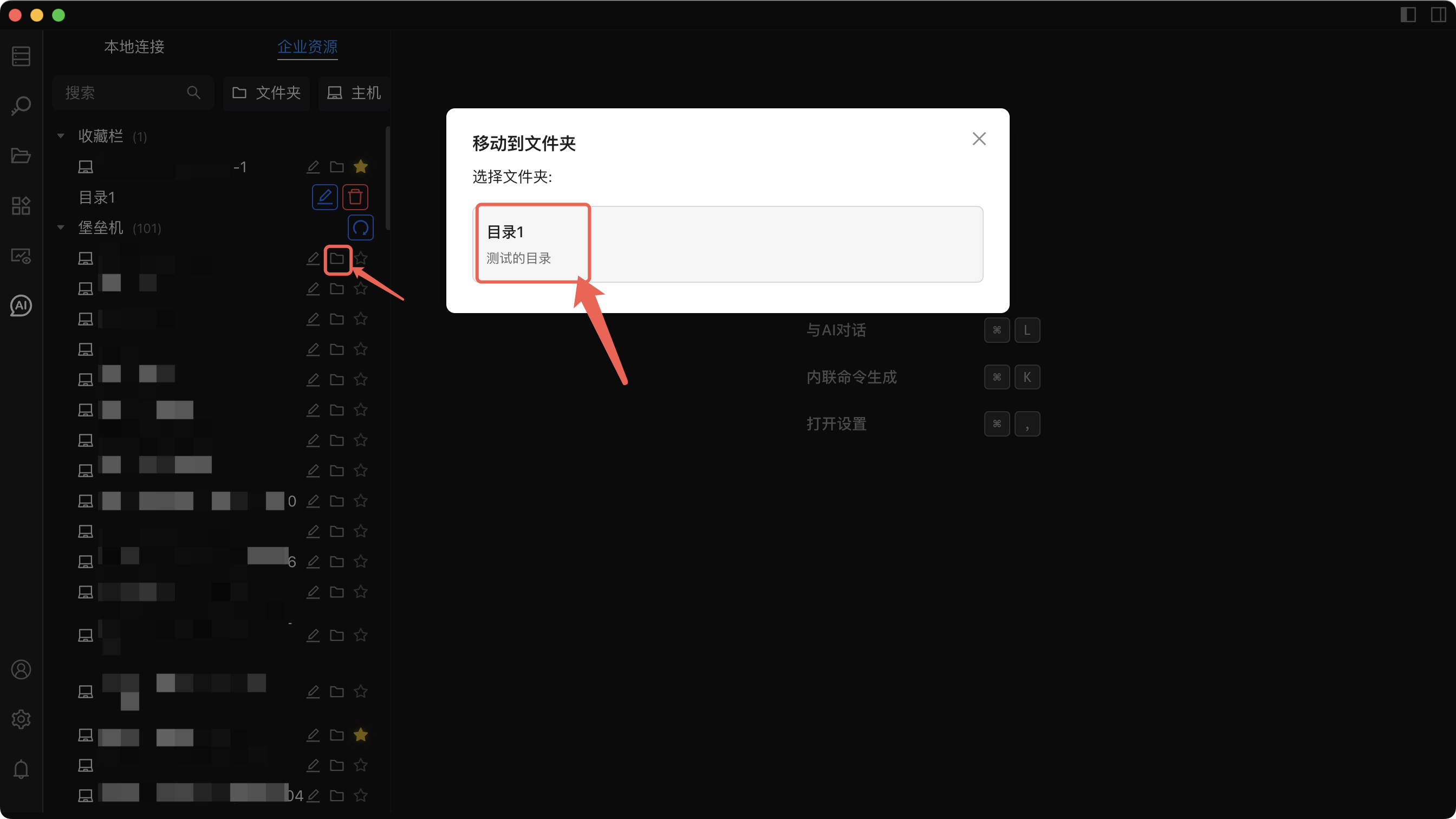
Technical Advantages:
Flexible asset grouping and categorization
Visual folder management interface
Intelligent search and filtering functions
Customizable views and quick access
2. Connection Route Optimization
Traditional Route
↑ ↑ ↑
Manual Connection Manual Selection Final Target
Optimized Route
↑ ↑ ↑
One-Click Operation Automatic Routing Direct Access
Feature Enhancement: AI Agent Integration
Comparison of Traditional Mode vs. AI Enhanced Mode
Limitations of Traditional Operation Mode
In traditional mode, operations personnel need to:
Manually enter complex commands
Execute operations server by server
Manually analyze execution results
Lack of intelligent assistance
AI Command Mode: Terminal-level Intelligent Assistant
Suitable for scenarios requiring strong interaction with the current terminal:
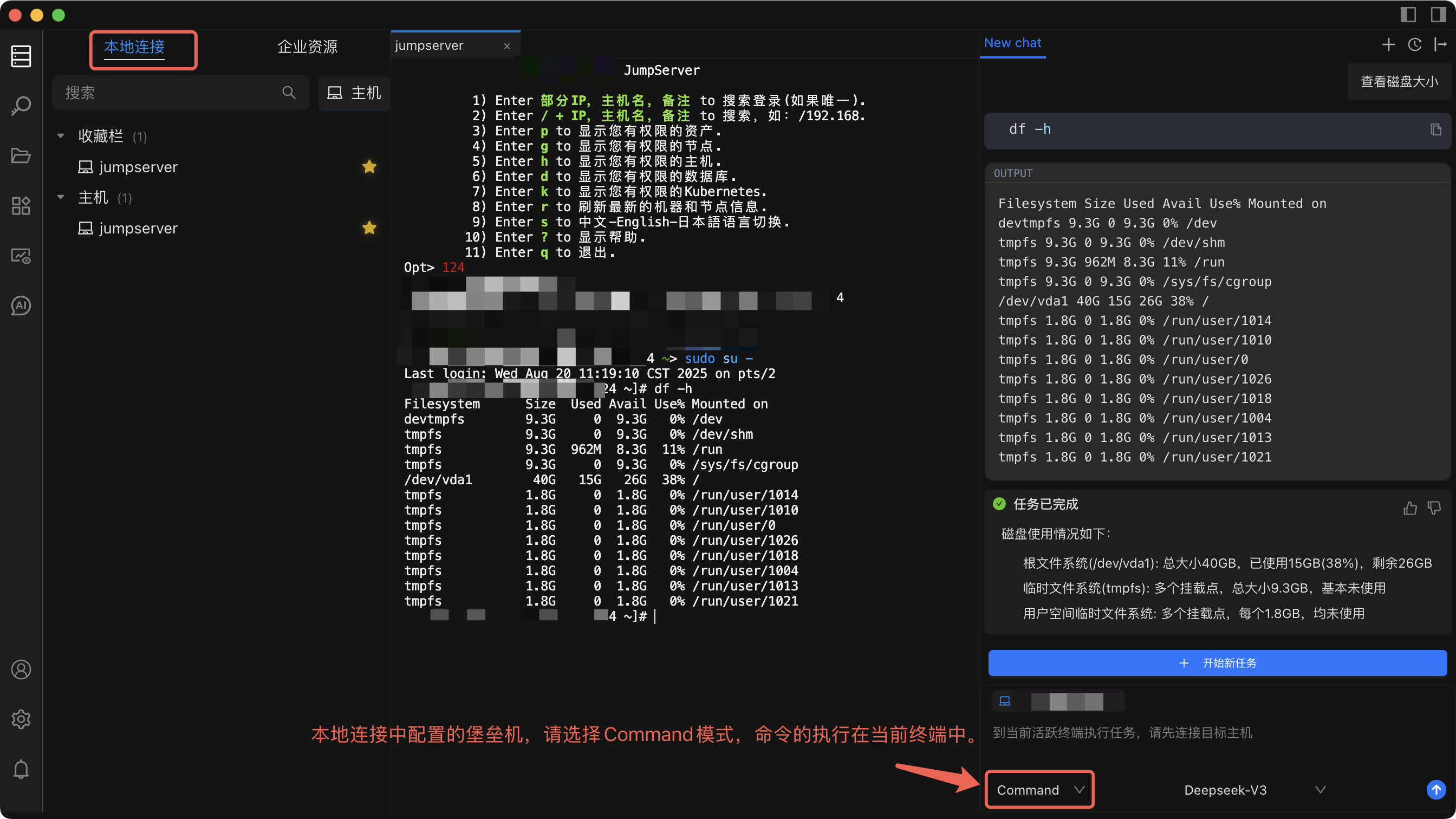
Technology Comparison:
# Traditional Method: Manual Command Execution
$ cd /var/log
$ tail -f application.log
$ grep "ERROR" application.log
$ wc -l application.log
# AI Command Mode: Natural Language Interaction
> View error messages in application logs and count the number
Technical Features:
Real-time terminal interaction and response
Context awareness and memory
Command history and learning
Intelligent command generation and optimization
Automatic error detection and repair suggestions
Multi-language command support
Applicable Scenarios:
Standalone debugging and development
Environment setup
Strong interaction with the current terminal
AI Agent Mode: Cross-host Intelligent Operation and Maintenance
Suitable for multi-host batch operation scenarios:
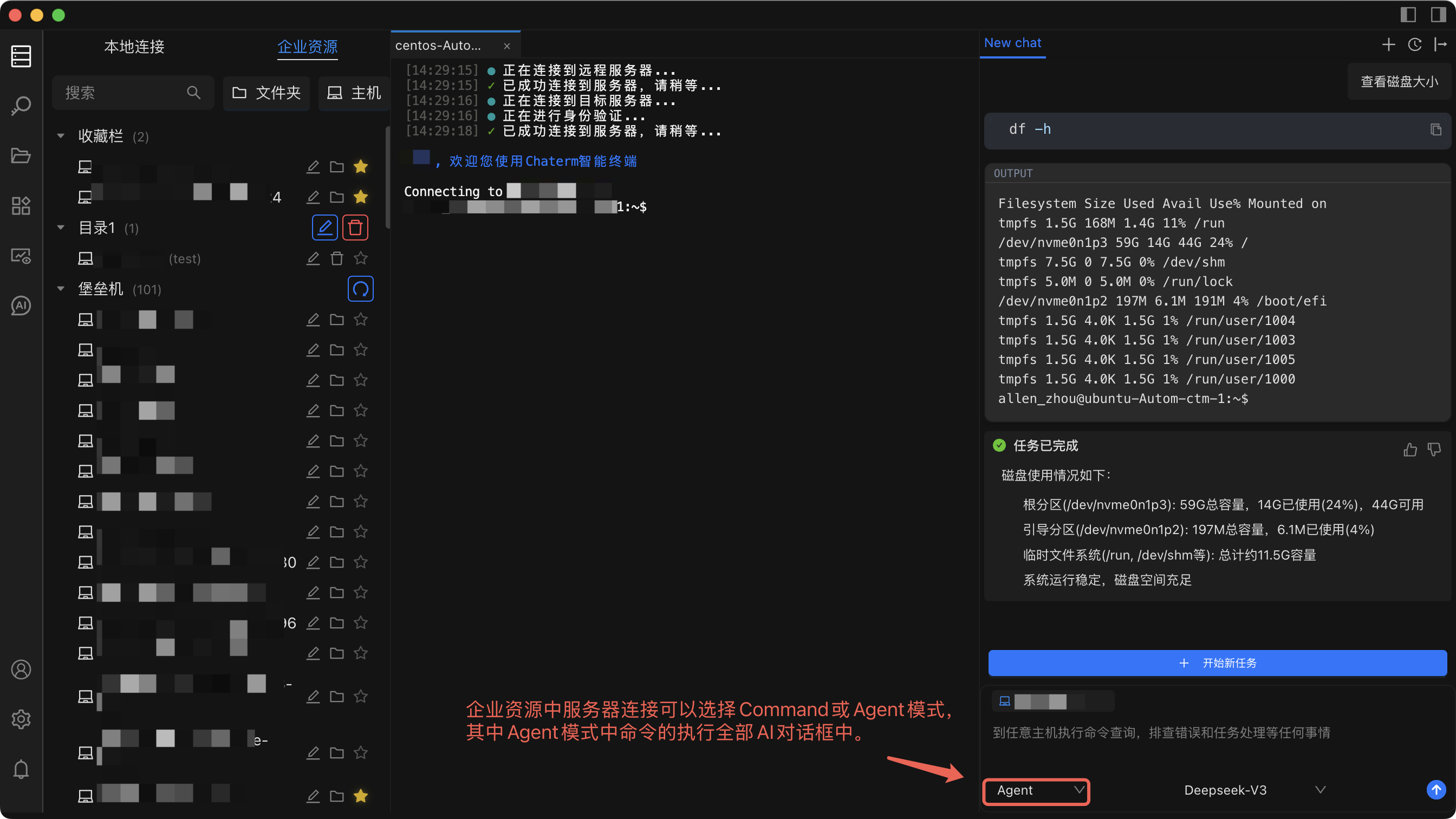
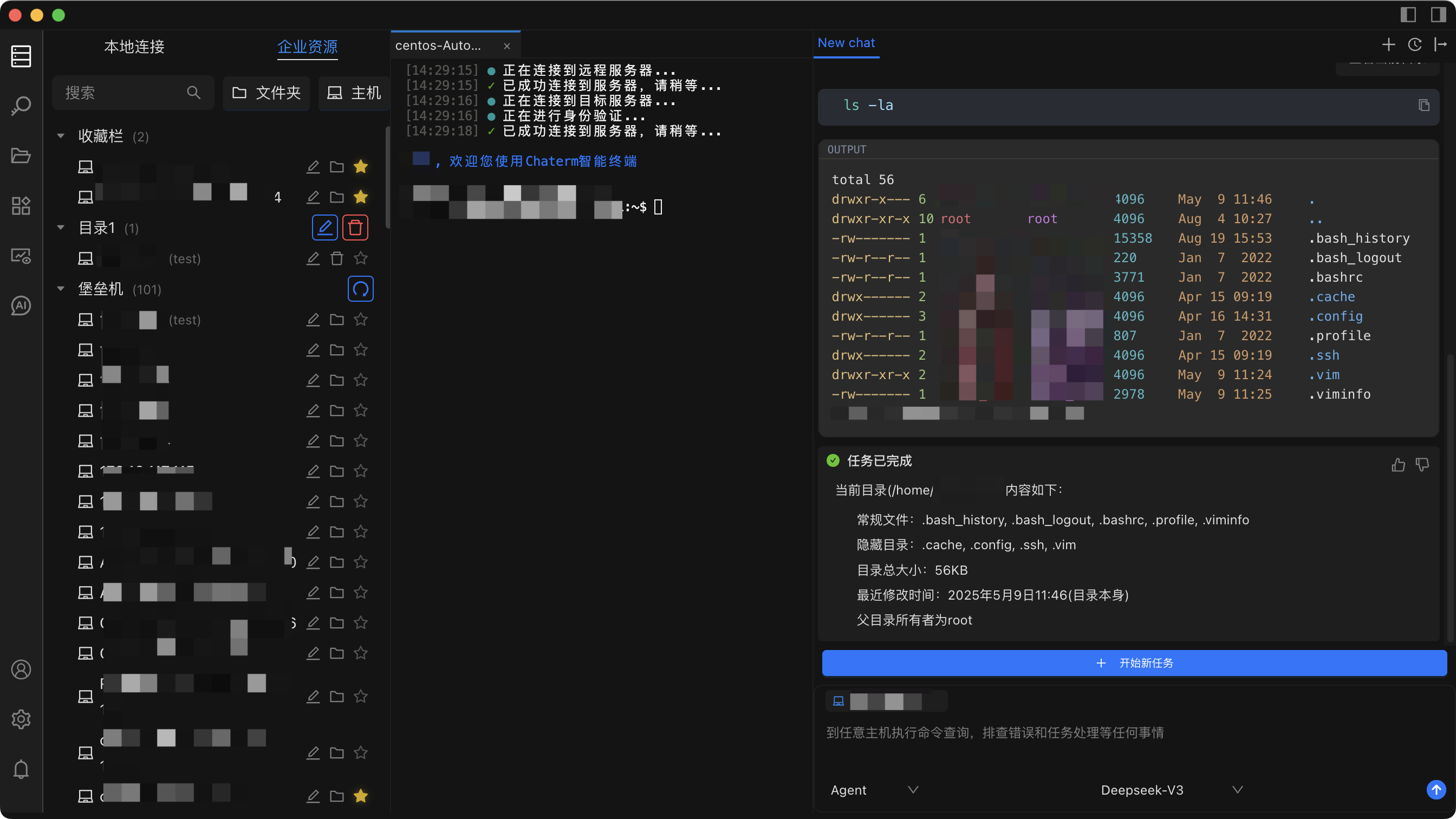
Technology Comparison:
# Traditional Method: Operation on each server individually
server1: ssh user@server1 && systemctl restart nginx
server2: ssh user@server2 && systemctl restart nginx
server3: ssh user@server3 && systemctl restart nginx
server4: ssh user@server4 && systemctl restart nginx

# AI Agent Mode: Batch Intelligent Operation
> Restart the Nginx service on all web servers.
Technical Features:
Batch task parallel execution
Intelligent error detection and handling
Operation result aggregation and analysis
Fully automated execution and monitoring
Task dependency management
Real-time execution progress feedback
Applicable Scenarios:
Multi-host task processing
Application service deployment
System problem troubleshooting
Automated operation and maintenance
AI Mode Technical Architecture Comparison
| Features | Traditional Mode | Command Mode | Agent Mode |
|---|---|---|---|
| Execution Scope | Single machine | Current terminal | Any host |
| Interaction Method | Manual command | Natural language | Natural language |
| Result Display | Terminal output | Terminal output | AI dialog box |
| Automation Level | Manual | Semi-automatic | Semi/fully automatic |
| Applicable Scenarios | General | Single machine debugging | Batch operation and maintenance |
Performance and Efficiency Comparison: Quantitative Analysis
Connection Time Comparison Analysis
| Operation Type | Traditional Mode | Innovative Mode | Efficiency Improvement | Technical Reasons |
|---|---|---|---|---|
| Initial Connection | 20-60 seconds | 5-10 seconds | 83%+ | Eliminating Intermediate Jumps |
| Repeated Connections | 15-30 seconds | 2-5 seconds | 85%+ | Intelligent Routing Caching |
| Batch Operations | Linear Growth | Parallel Processing | 90%+ | Concurrent Connection Pool |
| Error Recovery | Manual Retry | Automatic Reconnection | 95%+ | Intelligent Failover |
Operation Complexity Comparison
# Traditional Mode Operation Complexity
traditional_complexity = {
"steps": 4,
"manual_operations": 3,
"error_prone": True,
"time_cost": "high",
"learning_curve": "steep",
"maintenance": "manual"
}
# Innovative mode operation complexity
innovative_complexity = {
"steps": 1,
"manual_operations": 0,
"error_prone": False,
"time_cost": "low",
"learning_curve": "gentle",
"maintenance": "automatic"
}
Quantitative Improvement of Operation and Maintenance Efficiency
Comparison of Daily Operation and Maintenance Scenarios
Scenario 1: Daily Server Inspection
# Traditional Mode: Checking Connections One by One
for server in servers:
ssh jumpserver
select server
ssh server
check_status
logout
logout
# Total Time: 10 minutes (10 servers)
# Innovative Mode: Batch Intelligent Inspection
> Check the system status of all production servers
# Total Time: 1 minute (parallel processing)
Scenario 2: Application Deployment
# Traditional Mode: Manual Deployment
ssh jumpserver
select web-server-1
ssh web-server-1
deploy_app
logout
logout
# Repeat 10 times...
# Total Time: 30 minutes
# Innovative Mode: Smart Deployment
> Deploy the new version of the application on all web servers
# Total Time: 3 minutes
Cost-Benefit Analysis
| Indicators | Traditional Model | Innovative Model | Improvement Scope | Specific Impact |
|---|---|---|---|---|
| Maintenance Personnel Time Cost | High | Low | 80% Reduction | Improved Work Efficiency |
| Error Rate | 5-10% | <1% | 90% Reduction | Reduced Maintenance Risk |
| Training Cost | High | Low | 70% Reduction | Quick Start |
| Maintenance Cost | High | Low | 85% Reduction | Reduced Manual Intervention |
| Response Time | 30-60 seconds | 5-10 seconds | 83% Reduction | Improved User Experience |
| Concurrency Processing Capability | Serial | Parallel | 90%+ Improvement | Supports Large-Scale Maintenance |
Best Practice Recommendations
1. Enterprise-Level Deployment Recommendations
Environment Configuration Strategy
Production Environment: Enterprise resource mode is recommended to ensure security and manageability.
Development Environment: Local connection mode can be used to maintain flexibility.
Hybrid Environment: Select different modes based on server importance.
2. AI Agent Usage Recommendations
Mode Selection Guide
Command Mode: Suitable for single-machine debugging and development environments.
Agent Mode: Suitable for batch operation and deployment scenarios.
Production Environment: It is recommended to disable automatic execution and use manual confirmation mode.
Conclusion
Chaterm, through technological innovation, has successfully solved the efficiency pain points of traditional bastion host usage, providing a brand-new solution for enterprise-level IT operations and maintenance. From traditional jumps to one-click access, from manual management to intelligent asset management, from purely manual operation to AI-assisted operation and maintenance, Chatem is redefining the standard for bastion host usage.
If you have any questions about the technical implementation or would like to learn more about the technical details, please feel free to contact us through the following channels:
Reference
- Website:https://chaterm.ai/
- Github:https://github.com/chaterm/Chaterm